Sunday, 14 June 2020

Hollerith Tabulating Machine (1890)

1890 Hollerith Tabulating Machine
Introduced June 1890

The United States has a census every ten years, an essential act of counting all the population of the country and working out their demographics. But as the population grew in the 19th century, so it took longer and longer to take the census and process all the information. By 1880 the whole process took eight years, nearly long enough to clash with the 1890 census. Something had to be done.

The key part to processing the census more quickly (and cheaply) was the punched card. First introduced in 1804 (more than two centuries ago!) with the semi-automated Jacquard Loom, punched cards allowed binary data to be stored and read by simple mechanical and later electro-mechanical devices. It seemed to American inventor Herman Hollerith that this could be a key part of the solution to the census problem.

For the new census, data was still collected on paper but it was then transcribed to a punched card with 12 rows and 12 columns of binary data, marked by the presence or absence of a hole. The key element was Hollerith's Tabulating Machine. An electromechanical sensor combined with a simple counting dial could then add up the data in a variety of ways, which allowed for all sorts of data analysis.

100 million cards were made, and each was processed just four times to come up with the variety of statistics that the census office wanted. It took two years off the time it took to process the data, but the lasting legacy of the tabulating machine was much deeper. For the first time it showed that automation could be used to process data on a large scale. And remember… this was 1890.

Hollerith’s business grew and in 1896 he create the Tabulating Machine Company, which then in 1911 merged with some other businesses to become the awkwardly named Computing-Tabulating-Recording Company. In 1924 this company renamed itself to International Business Machines (IBM). And a century after the Tabulating Machine’s success in the 1890 Census IBM gave us... errr… the PS/1.


Punched card from a Hollerith Machine
As it happens, the Hollerith Machine could be used for evil as well as good. The Nazi regime used demographic data collected on punched cards extensively with horrifying consequences.

Hollerith’s tabulating machine popularised the punched card, something still seen today sometimes in voting machines but which generally fell out of use in the 1980s. Today punched cards can be quite collectable, especially for more obscure systems or ones with some historical interest. However, most people who actually did use them don’t miss them at all... especially if you’ve ever dropped a big pile on the floor and have then had to sort them back into order by hand.

Image credits:
Diane Maine via Flickr – CC BY-NC 2.0
Marcin Wichary via Flickr – CC BY 2.0

Sunday, 7 June 2020

IBM PS/1 (1990)

IBM PS/1 Model 2011
Introduced June 1990

By 1990 the PC-compatible marketplace had changed a lot since the launch of the original IBM PC (model 5150) in 1981. No longer just the choice of businesses, PCs had largely replaced an eclectic range of incompatible home microcomputers that had dominated the earlier 1980s. It was increasingly common to see PCs in the home, but they weren’t generally IBM PCs despite IBM inventing the platform.

IBM had tried to break into the home computing market in 1984 with the IBM PCjr, a short-lived crippled version of the PC that was a sales catastrophe. Apparently unperturbed by this, in 1990 IBM tried to break into the same market again… and they repeated many of the same mistakes they had done years earlier.

Worse still, IBM’s attempt to redefine the business PC market with the IBM PS/2 launched a few years earlier was floundering. Instead of moving the market from DOS and the old ISA hardware architecture to OS/2 and Micro Channel Architecture (MCA) it seemed that IBM just split the market between themselves and competitors such as Compaq who were improving the old platforms instead.

In 1990 IBM tried a shift in direction with the new IBM PS/1. Rather more based on traditional PC architecture than the PS/2, it was designed for home users who wanted to be able to unpack something from the box and get working in minutes Models such as the 2011 made this really easy, and when assembled they booted into a friendly screen allowing easy access to DOS, Microsoft Works on online services if they had been included.

IBM PS/1 Model 2133
A Mac-like simplicity to the hardware had some drawbacks – it wasn’t really expandable and the non-standard power arrangement where the computer was powered by the monitor (like the Amstrad PC1512) meant that you were stuck with using the IBM PS/1 monitor for ever.

The hardware was excellent though, and it wasn’t stupidly expensive (competing with Compaq on the likes of price), but consumers were not that interested. It didn’t help that IBM had to create a completely new sales channel for the things as traditional IBM dealers didn’t sell to consumers, but in the US large-deal with Sears who bundled access to Prodigy with the computers. On early models DOS was included in ROM, which made the machines very quick to boot up.

Consumers were cool about the PS/1 though, preferring other brands where they were available. IBM was still seen as a business PC, and the incompatibilities of the PS/2 range rubbed off on the PS/1 even though it was a different hardware platform. IBM stuck with the range though, making the machines more expandable and more standard in terms of hardware and software.

The range lasted until 1994 when IBM replaced the PS/1 range with the architecturally similar but more appealing IBM Aptiva range which continued until IBM’s exit from the home PC market in 2001. Today the PS/1 is an uncommon beast but it commands decent prices of about £500 to £700 or depending on model.

Image credits:
Kungfoocow369 via Wikimedia Commons – Public Domain
Science Museum, London – CC BY-NC-SA 4.0


Wednesday, 3 June 2020

Digital VT05 and VT420 (1970 and 1990)


The video terminal is the unsung hero of the computing world. Often toiling aware in warehouse, factories, colleges, shops and other places out of the public eye, the video terminal was a dependable workhorse for decades… well into the era of the PC.

Arguably the king of the terminal market was Digital Equipment Corporation (“DEC” or just “Digital”) who made terminals that were attached to minicomputers or mainframes, where they could run a wide variety of centralised applications that typically ran on Unix or VMS boxes.

They comprised of not much more than a display, keyboard and serial interface – and although they were not always cheap to buy, they were certainly cheap to run with no moving parts and complete immunity to computer viruses and other malfeasance. You could plug one in and forget about it for years, and it would keep doing its job.

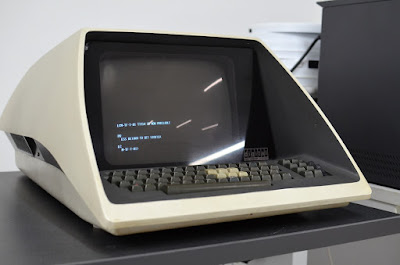
DEC VT05
DEC VT05
The DEC VT05 was introduced in 1970 and was Digital’s first standalone raster video terminal. Sure, I could tell you that it was a bit of an upgrade from the glass teletype concept with a bit of cursor control thrown in but probably the thing about the VT05 that most people will notice is how it looks. Digital’s radical space-age design made it look like the terminal was leaping out of the work surface. Inside the system boards were slanted behind the CRT rather than subsequent models which were more conventional inside. It looked fantastic, but the downside was that the VT05 was 30 inches (76 centimetres) deep which meant that you’d likely have to re-engineer your working environment to put one in. At 55 pounds (25 kilograms) it was hardly a lightweight device, so you wouldn’t want to move it anyway.

It could only display uppercase characters, but the keyboard could enter both upper and lowercase. Quite how you were meant to tell what you were typing is a mystery. Maximum data transfer rate was 2400 baud. The VT05 had a video input so you could display other things on the monitor, and mix them together with the text. The VT05 was around for five years until the much more capable – and conventional – VT52 was launched.

DEC VT420
DEC VT420
Fast forward twenty years and the direct descendant of the VT05 – the VT420 – is launched. Don’t expect two decade of development to count for all that much though, the VT420 was still conceptually the same thing. Unlike the VT05, the VT420 was a practical design with a separate keyboard and a monitor on a tilt-and-swivel stand that was supplied as standard (unlike previous versions). It weighed just 8kg so wasn’t a problem to move about a bit, and the ANSI character set that it supported allowed full cursor addressability and enough predefined graphics to make a nice user interface.

The VT420 also supported dual sessions, typically by using the two serial ports on the back. Not only could you interact with two utterly different systems, but you could also copy-and-paste between them. That might not seem like a big deal now, but back in 1990 most people still couldn’t paste data between applications on their PCs so it was kind of a big deal.

The data transfer rate was a speedy 38,400 baud using the compact phone-like MMJ sockets, the screen had a maximum capacity of 132 x 48 lines of text and the latest revision of DEC’s legendary keyboard – the LK401 – was almost perfect in every way except for the annoying lack of an Escape key.

Where the VT05 marked a point near the beginning of DEC’s journey, the VT420 marked a point near the end. The days of centralised minicomputers were starting to fade and throughout the 1990s PCs and Macs became more capable professional computing environments. The VT420 was a success but it lasted just three years before being replaced by the VT520 which was almost identical. DEC sold the entire terminal division in 1995 and they themselves were taken over by Compaq in 1998, who were then taken over by HP in 2002.

The VT range soldiered on with Boundless Technologies until 2003, and other manufacturers either closed down or shuttered production in the following years, including Wyse and Qume until there were none left.

Even though the manufacturing of terminals dried up, the computer systems that relied on them still exist. VT terminals are still in use around the world, but newer installations will typically rely on a PC with some terminal emulation software – a more complex and less reliable solution.

Today a DEC VT420 in good condition second-hand can cost a couple of hundred pounds, and maybe budget a thousand or so if you want to acquire a VT05. Of course terminal emulators can be had for less, a client such as PuTTY is free or Reflection is a more commercial offering.

Image credits:
Matthew Ratzloff via Flickr – CC BY-NC-ND 2.0
Adamantios via Wikimedia Commons – CC BY-SA 3.0


Tuesday, 26 May 2020

Nokia 770 vs HTC Universal (2005)

HTC Universal in vanilla form and an O2 XDA Exec
Fifteen years ago the golden age of mobile phones was in full swing – each generation added new features, but most phones concentrated on the business of making phone calls, playing games and taking a few grainy photos. But on the higher end of the market were devices that would lay a path followed by the smartphones of today. Two of these were the Nokia 770 and the HTC Universal.

In 2005 HTC exclusively made devices sold with the names of other companies on them – so the HTC Universal went under many names including the O2 XDA Exec, T-Mobile MDA IV, Qtek 9000 and i-mate JASJAR. Despite the marketing confusion, HTC’s reputation was growing… but it would still be another year before HTC would sell phones under its own name.

The Universal itself was ground-breaking. Here was a smartphone with absolutely everything – a smartphone with a large 3.6” VGA-resolution touchscreen display on a swivelling hinge, a physical QWERTY keyboard, front and rear cameras, expandable memory, Bluetooth, infra-red connectivity, WiFi and 3G. The only thing missing from the feature list was GPS, which was a rare option back then (although the rival Motorola A1000 did feature GPS).

It was a big device for the time, measuring 127 x 81 x 25mm and weighing 285 grams. But in modern terms, that’s about the same footprint as the iPhone 11 but about 50% heaver and three times thicker. The swivelling hinge meant that you could use the Universal like a mini-laptop or a PDA.

There were flaws – it could have used more RAM, the VGA resolution screen was effectively a just a scaled-up QVGA screen most of the time and the new version of Windows it came with was still clunky and harder to use than a modern OS. The wallet-lightening price of nearly €1000 for SIM-free versions compared unfavourably with laptops of the same era, and while the Universal had awesome mobile working capabilities it just wasn’t as powerful as a real computer. And from a practical point of view, the sheer size and weight made it impractical to use as a mobile phone from the point of view of a customer in 2005.

Nokia 770 Internet Tablet
Nokia on the other hand were trying something different. The Nokia 770 Internet Tablet wasn’t a phone at all but was instead a compact Linux-based computer with built-in WiFi and Bluetooth for connectivity. You could still use the 770 pretty much anywhere, but you’d need to spend a little time pairing it with your regularly mobile phone and setting it up as a modem.

There was no camera or keyboard either, but there was a huge (for its day) 4.1” 800 x 480 pixel touchscreen display, expandable memory and pretty decent multimedia support. The operating system was Maemo, a Linux-based platform that was quite different from Nokia’s regular Symbian OS. It was wider but thinner than the Universal and at 230 grams a good deal lighter.

The whole Internet Table project was a bit left-field for Nokia, but it attracted a small but dedicated following. Many were attracted by the idea of using Linux on a small handheld computer which was a fresh idea, indeed in retrospect it seems trailblazing because both iOS and Android are closely related to Linux.

The 770 suffered from a lack of software at first, although it didn’t take long for Linux application to be ported across. The processor was a bit slow and there was a lack of RAM which hampered things, and some people just couldn’t get used to the idea of carrying two devices. It was successful enough though to spawn several sequels, which is a different story.

Even though the 770 was priced at just €370 (about a third of the price of the Universal) there was some criticism that it was expensive. In retrospect it looks positively cheap though, and although modern tablets are much bigger there are many echoes of modern smart devices here.

Neither the 770 nor the Universal were a huge success, perhaps partly because the technology of 2005 wasn’t quite good enough to deliver the results people wanted, and perhaps partly because consumers didn’t understand that they wanted all these features from a mobile device until handsets such as the original iPhone came along.

Today both devices are fairly collectable, with the HTC Universal coming in between £100 to £350 or so depending on condition and about £80 to £250 for the Nokia 770. Oh, and the winner between the two? The Nokia 770's software platform is pretty close to what we use today, with the "everything but the kitchen sink" hardware specs of the HTC Universal. Let's call this one a tie.


Image credits: HTC, O2, Nokia

Saturday, 23 May 2020

Windows 3.0 (1990)

Software... in a box!
Introduced May 1990

By 1990 Microsoft’s Windows platform had been around for five years and had made pretty much no market impact at all. Early versions of Windows were truly terrible and combined the very worst of clunky user interface design with the technological backwardness of late 1980s IBM-compatible PCs.

Most PC users stuck with plain old-fashioned DOS and were seemingly happy to run just one program at a time, each with a different user interface and incompatible file formats. WordPerfect, Lotus 1-2-3 and dBase and ruled the market – all very different products from different vendors. But a high-end business PC could have an Intel 80386 running at 20 or 25MHz with up to 4MB of RAM, plus a VGA card and a 100MB hard disk and a really high-end system might have a powerful 486 processor inside. But by a large of lot of these systems just ran DOS programs… but very, very quickly.

The limitations of DOS were pretty crushing. One application at a time and a maximum memory address space of 640KB. Various tools and memory managers existed, but many of these were incompatible with each other and they couldn’t make up for the clumsiness of DOS itself. Microsoft’s way out of this was to partner with IBM to make a new operating system called OS/2. This had been developed alongside earlier versions of Windows, but it was a much more modern operating system designed for 80286 processors and above where Windows 1 and 2 could run (just about) on a first generation 8086-based PC.

But Microsoft too had been pushing technological limits with Windows/286 and Windows/386 with special versions of Windows 2.1 which maintained the clunky look-and-feel of the old Windows but could actually take advantage of newer CPUs, including multi-tasking DOS applications. These were niche products, but when Windows 3.0 was introduced in May 1990 it included enhanced support for the 286 and 386 processors out of the box.

Not only was it better underneath, but Windows 3.0 had a complete overhaul of the user interface, featuring the application-orientated Program Manager rather than the brutally ugly and simplistic MS-DOS Executive in previous versions. Utilising attractive icons and taking advantage of what was then high-resolution VGA graphics, Windows 3.0 was approaching the usability of the Macintosh – although the Mac’s Finder was more about data files than programs.
That's a billion person-hours down the drain then

Windows 3.0 design was a mix of polished-up elements from previous versions of Windows with a rather flat feel to them, along with 3D elements largely borrowed from Presentation Manager in OS/2. Compared with modern minimalistic versions of Windows, Windows 3.0 had a lot of “Chrome” around the edges which resulted in visual clutter and wasted space. But it certainly wasn’t bad looking for a 30-year-old design.

It had flaws – many flaws – in particular it wasn’t very stable and the dreaded Unrecoverable Application Error (which was Windows 3.0’s Blue Screen of Death) was all too common. Driver support was fiddly, if you didn’t have a popular system out of the box then you’d need to acquire and install things like video drivers and sound drivers. Most importantly, it wasn’t really an operating system in its own right, it was an operating environment perched on top of the ancient DOS OS. It took another three years and a major schism with IBM to create a completely modern version of Windows with Windows NT.

Windows 3.0 was a huge success (perhaps in part to the maddeningly addictive card game of Solitaire it shipped with), and of course the quest for ease-of-use spread beyond the operating system itself. Microsoft Office 1.0 was launched in November 1990 with Word for Windows 1.1, Excel 2.0 and PowerPoint 2.0, typically priced at around half of what it would cost you to buy the programs separately. Windows 3.1 followed two years later with improvements all around, and because Microsoft would cut PC manufacturers a good deal to ship Windows with new PCs it eventually got everywhere and wiped out all the other PC-based opposition.

As an operating system it isn’t of much practical use today, but if you want to play with it there are a few places that you can get virtual machines to run under VirtualBox or VMware, and you can relive the frustrations of Solitaire if nothing else. Complete set of installation disks, boxes and manuals are quite collectable too with prices typically ranging from £60 to £100.


Image credit: David Orban via Flickr - CC BY 2.0

Tuesday, 12 May 2020

Pac-Man (1980)

Introduced in Japan, May 1980

The Golden Age of Arcade games is in full swing by May 1980, and it sees the launch of a gaming icon – Pac-Man. Developed in Japan by Namco, it followed on from their successful Galaxian shoot-‘em-up, but Pac-Man was a completely different type of game.

As with Galaxian, Pac-Man was powered by a Z80 processor, it had colour graphics with sprites and a dedicated graphics co-processor and a three-channel sound chip. Utilising and impressive array of technology from the era, the capable hardware platform allowed for a much richer gaming experience than earlier generations.

The game itself – first called Pakkuman and then Puck Man before becoming Pac-Man - is familiar to most, but in case it somehow passed you by, the player controls the Pac-Man (essentially a circle with a chomping mouse) who is chased around a maze by four ghosts (Blinky, Pinky, Inky and Clyde). Pac-Man’s job is to eat all the dots in the maze, if caught by a ghost he loses a life… but various power pills around the maze allow Pac-Man to eat the ghosts instead. The ghosts have different personalities and between them try to chase and trap Pac-Man.

With appealing graphics and sound, Pac-Man was a fun game to play – and it was also something different from the alien invasion or war games that dominated arcades. A slow burn at first, when Pac-Man hit the US in late 1980 it became a smash hit and the most popular game around, shipping 100,000 cabinets by 1981.

After arcade success came conversions to home computers and consoles, official and unofficial and of varying quality, and then there were endless sequels (notably Midway’s Ms. Pac Man), board games, TV shows, toys and other things you could spend your cash on. The franchise raked in billions of dollars and created an iconic character recognised throughout the world. Although there are many different ways to play Pac-Man today, if you want an original cabinet in good condition then you can expect to pay several thousand pounds.

Image credits:
Peter Handke via Flickr - CC0 1.0

Marcin Wichary via Flickr - CC BY 2.0

Friday, 8 May 2020

Penny Black (1840)

Rare block 4 of four unused Penny Blacks
Introduced May 1840

These days we mostly communicate with each other electronically – at the press of a button a message can be transmitted the anywhere in the world in a fraction of a second. But of course that wasn’t always the case, and not so long ago you would often rely on having to write a letter. On paper, in an envelope and typically written out by hand.

Postal systems had been around since at least 500 BC and possibly even earlier, but they tended to be haphazard, open to corruption and often only accessible to governments. Although this situation improved, by the 19th century most postal systems were still complex and unreliable – sometimes operating on a post-pay principle where the postage would be paid by the receiver, who might decline to pay (sometimes after reading the letter).

Reform was needed and in the spirit of Victorian innovation the government started to look for solutions. Eventually a proposal by Rowland Hill was accepted for an inexpensive, simple-to-use and universal postage system that would become the model for the rest of the world.

Before Hill’s reforms the price of postage depended on the distance the letter had to travel, making the system complicated to use. It was also expensive, so the volume of mail was quite low, and the Post Office was haemorrhaging money as a result. Instead a system was proposed where a letter of up to half an ounce (14 grams) could be sent prepaid for a uniform rate of just one penny, regardless of distance.

Penny Black Detail
To show that postage had been paid, a piece of gummed paper was cut out and stuck to the envelope – called a “stamp”. It was a peculiar thing to call a sticky bit of paper, but it referred to some older postal systems where the envelope was stamped with an actual stamp. This small piece of paper had a portrait of Queen Victoria on it and was black in colour, becoming known as the “Penny Black”.

Introduced in May 1840, the Penny Black and the postal system it represented became the model for every other country, and the stamp itself became an icon. But it didn’t last long. The black colour of the stamp made it very hard to see cancellation marks, meaning that the stamp could sometimes be carefully removed and re-used, so in February 1841 the stamp was redesigned in a red colour – and this version in one form or another continued in production until 1879.

The system was simple to use and inexpensive (one penny in 1840 terms is worth about 42 pence today). It was a huge success, and it allowed people from all classes to communicate with anyone else in the country, reliably and for a modest amount of money. Over the next few years the same model was adapted by most other countries, and an era of low-cost and reliable communication was born.

Today of course the Penny Black is very collectable, with prices typically starting at about £50 for a used one in decent condition and then heading upwards to thousands or tens of thousands of pounds. Given the short period of time that the Penny Black had been available, combined with the fact that the hobby of stamp collecting didn’t really exist until stamps did, it does add a certain rarity value to these stamps – but every semi-serious collector will either own one or aspire to it. Alternatively you could buy the modern day equivalent – a British first-class stamp currently costs 76p which is 182.4 times more expensive than the original.

Image Credits: [1] [2] 
Metropolitan Museum of Art via Wikimedia Commons - CC0 1.0